A 12.12 sale landing page must make the offer, deadline and route to ordering clear. The photograph count decides whether you can finish it in time for Saturday 12 December 2026.
There is no dedicated 12.12 template in the library. We recommend Dated Flash Sale if you have a compact promotion, or 11.11 Flash Sale if your catalogue is organised into categories, deals and bundles. Choose between the layouts by the photographs they need and the order action they support. Then replace the sample sale content with your offer.
Work backwards from Saturday 12 December 2026
We recommend publishing by Friday 11 December, before campaign traffic starts. This is our editorial launch recommendation; it is not a benchmark.
Before editing, gather the photographs, selected products, prices, stock availability and purchase destinations. Shortlist layouts by the number of photographs they need, then check that the form fits the action you want customers to take.
Our Ecommerce landing page templates include sale layouts for offers where the discount, deadline and selected products are the reason to visit. Choose a layout that fits the timing and availability of your offer and gives visitors a clear route to those products.
landflow makes lead-collection landing pages: each page has one conversion goal and one lead form. It does not provide shop infrastructure. Keep your existing purchase route where payment is needed; an order form does not establish payment processing.
Seven or ten photographs: private access or a public flash sale
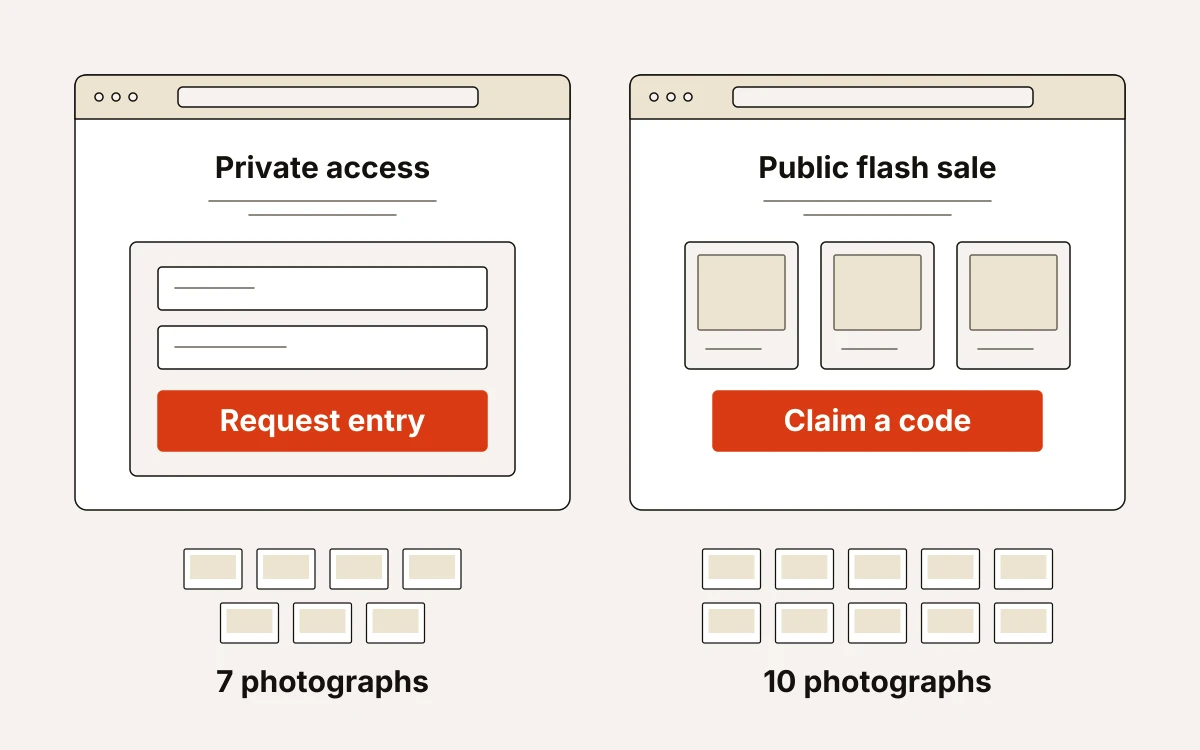
Choose private access when visitors must request entry; choose a public flash sale when they should browse deals and claim a code. We would settle that action before choosing the styling.
Private Members Access: requests to join a private sale
Private Members Access has nine sections, seven photographs, four colour schemes and an Order form. It combines a timed opening, selected products and membership detail, then closes with Join the private sale, which collects access requests before a deadline.
Use it if eligibility is part of your offer. Replace the sample occasion with your 12.12 sale, state who qualifies and explain member pricing terms. Set the countdown end time and form fields to suit the access request. Promise only the response you can deliver, and keep claims about exclusive pieces or early arrivals only where you have evidence.
Dated Flash Sale: selected deals with a fixed deadline
Dated Flash Sale has ten sections, ten photographs, a promo urgency layout and an Order form. Its sale-led opening, live countdown and featured deals lead to a closing Claim form.
The image workload is explicit: one in Hero, four in Deals, one in Gear, three in Shop and one in Claim. Deals includes buy actions; the example form promises a code by inbox. Replace the occasion wording, deadline and code-delivery promise with your actual 12.12 process.
Twelve or eighteen photographs: seasonal retail or pantry orders
We’d choose Holiday Gift Sale for selected seasonal products and collections; Grocer Weekend Offers fits packaged food and pantry orders. Choose for the buying task and the number of photographs you can supply.
Holiday Gift Sale: seasonal products and shop information
Holiday Gift Sale has nine sections, twelve photographs, four colour schemes and an Order form. Built for fashion and culture-led retailers, it puts a timed sale before selected products, limited collections, shop details and sale information.
The layout needs one image in Hero, five for featured sale picks, three in Logo strip and three for Collections. Limited time collections groups three offers and includes the form.
Replace the seasonal wording with your 12.12 offer. Supply collection details and genuine deadlines. State the form’s purpose explicitly so buyers know what submitting it requests, without implying that payment is taken.
Grocer Weekend Offers: packaged food and pantry purchases
Grocer Weekend Offers has twelve sections, eighteen photographs, a paper collage layout and an Order form. It suits organic grocers, farm shops and food producers taking pantry purchases or order enquiries.
Prepare product names, offers and prices for Our Pantry, then match Shop Pantry or Add to Cart actions to your ordering process. Bring Good Food Home collects customer details and requires one photograph. State its next step clearly, such as an order enquiry followed by confirmation. Write the Saturday order deadline plainly: this template has no separate countdown or timed-offer band.
Kids 11.11 Sale: twenty photographs and a price-hold request
Choose Kids 11.11 Sale if parents should reserve a stated sale price rather than pay on the page. It is built for children’s clothing, toy, baby-product and gift shops, with twelve sections, twenty photographs and an Order form.
Categories organise the range, and bundles group the offers. Parent-focused reassurance helps parents decide. The countdown sets the deadline, while Hold Your 11.11 Price collects reservation requests. The template does not take payment within its listed sections.
For 12.12, replace every 11.11 reference, including that section heading. Update the offers and countdown to match. Define the form fields, supply the three listed details, and write out the fulfilment process and terms for the 48-hour price hold.
We would settle those details before choosing the styling. The four colour schemes are Coral, Berry, Meadow and Sky. Plus Jakarta Sans handles display and body text; alternatives pair Baloo 2 or Patrick Hand with Plus Jakarta Sans.
Adapt 11.11 Flash Sale into a 12.12 sale landing page
Choose 11.11 Flash Sale if your catalogue can support category browsing, flash deals and a bundle. For a single promoted product, choose another template. It has twelve sections, twenty-eight photographs, a split hero and an Order form.
We would adapt the content before choosing colours:
- Hero: rename the event, set the date to Saturday 12 December 2026 and set the countdown to your actual offer deadline. Check that “Shop All Deals” leads to the intended products.
- Shop by Category: supply six category photographs, clear names and correct destinations for each selection.
- Flash deals: replace the sample products and offers with your promoted range, prices and offer limits.
- The 11.11 Tech Bundle: rename it for your 12.12 offer. Supply one photograph, four included items, an accurate bundle price and fulfilment details.
- Get Tomorrow’s Deals Today: adapt its shopper-preference collection to your chosen lead goal. Retain the promise of alerts ten minutes in advance only if you can fulfil it. State what submitting the form requests and what happens next. The form alone does not establish payment processing.
- Questions? We’ve Got Answers: replace the sample 24/7 chat promise with your actual support availability.
Once the content is ready, choose the styling. The colour schemes are Flash orange, Crimson, Cobalt and Ink. Hanken Grotesk handles display and body text; alternatives pair Kalam or Archivo with Hanken Grotesk.
Bundle And Save: twenty-nine photographs for a lifestyle-led sale
We’d choose Bundle And Save when grouping products by mood helps shoppers choose what to buy in the sale. Its collage hero and shopping bands make the image workload worthwhile if those groupings help people decide.
Bundle And Save has eight sections, twenty-nine photographs and an Order form. Shop by mood takes sixteen photographs, with accurate theme labels and links to relevant items. The countdown gives the short sale its deadline.
Replace the Bangkok wording with your actual 12.12 offer and setting. In Brighter, explain what the form requests. In Questions, replace the accordion answers with your own pre-purchase details and contact wording. There is no dedicated bundle builder or separate discount-code mechanism.
The four colour schemes are Neon Red, Amber, Jade and Indigo. Font pairings are Anton + Archivo, Caveat + Archivo and Oswald + Archivo. Choose these after the product groupings are ready.
What every sale page needs before publication
Publish only when the sample promises match what you can fulfil. Check the offer and ordering route as well as the layout.
- Offer and products: put the offer in the hero, select orderable products, confirm current prices and discounts, and check every purchase destination. We recommend keeping the primary action near the opening message and repeating it after the product detail.
- Timing and stock: match any countdown to the written deadline. Dated Flash Sale needs a fixed end time, correct time zone and stock policy. Its buy destinations must match the limited-stock message.
- Fulfilment: state delivery, returns and what happens after submission. If the offer is for gifts or seasonal occasions, include the relevant delivery or last-order date. Check Kids 11.11 Sale’s price-hold wording against your fulfilment process.
- Evidence: replace sample ratings, reviews and promises with substantiated claims.
Keep the chosen goal and form consistent. We stamp every lead server-side with source, medium, campaign, click ID, landing URL and consent state. The lead is written to the inbox before any pixel fires. Delivery then runs through a queue with retries.
Choose your starting template and run the final check
Before sending traffic, inspect the rendered mobile page, follow every purchase link and submit the form. Confirm that the request reaches the inbox. We make this check before publication. It should not wait until after launch.