landflow

Restaurant landing page templates

Two finished restaurant landing pages, one relaxed and one formal, plus food businesses elsewhere in the library. Each opens in the editor with its layout, photos and sample menu at no credit cost.

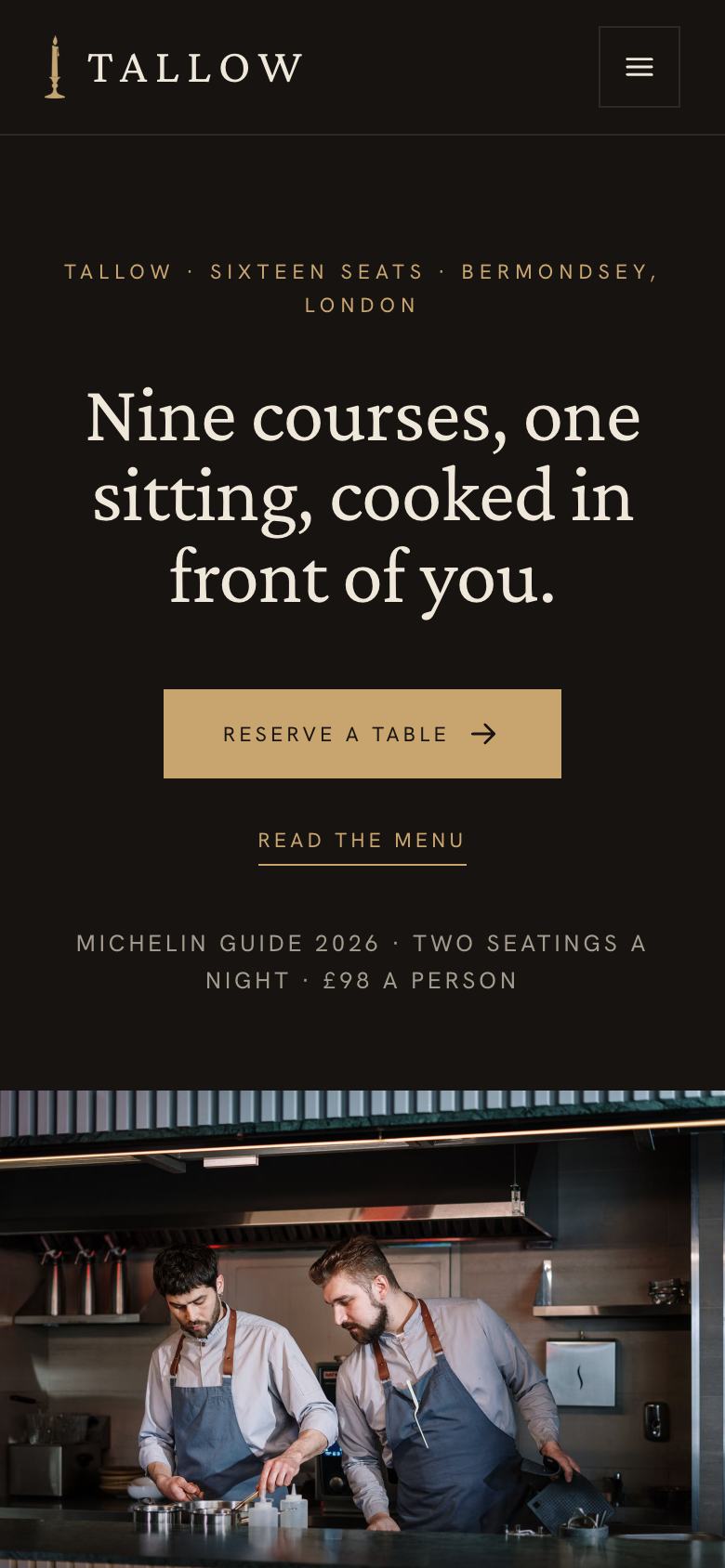
Seasonal Kitchen landing page templateChef's Table template on a phone
the guide

What the page needs, and which template fits

What a restaurant landing page has to do

Most people visit a restaurant website to check three things: when it is open, what is on the menu and how to book. A restaurant landing page should answer those in seconds, then give enough atmosphere to make the booking feel exciting.

The sections that fill tables

Hours. Right below the hero, because it is the most common question.

The menu. This week’s dishes with prices and where ingredients come from.

The room. Seats, counter, terrace and which tables are bookable.

Booking. How it works, deposits and group options.

Questions. Allergies, children, dogs and dress.

Choosing a template

Seasonal Kitchen is warm and everyday for neighbourhood restaurants, cafés and bakeries. Chef’s Table is dark and candlelit for tasting menus and chef’s counters. Food producers and shops have their own layouts, such as Grocer Weekend Offers, Coffee Roastery and Small-Batch Craft.

Common mistakes

An out-of-date menu. Guests arrive expecting a dish that is gone.

Hiding the booking policy. Deposits and cancellation should be clear before the request.

Stock food photography. Diners want to see your plates and your room.

Seasonal Kitchen or Chef’s Table, side by side

The two restaurant templates solve different problems, and the choice is less about cuisine than about how guests book. Seasonal Kitchen is built for a restaurant people return to often. It puts opening hours in the second band, lists a menu with individual dish prices, describes the room and the terrace, introduces the growers, and ends with a table booking that takes two minutes. It uses a warm cream ground, a friendly serif and eight photographs of dishes and the room in daylight.

Chef’s Table is built for a single evening that people plan weeks ahead. The menu is one fixed price, the evening is described hour by hour, seatings are released on a set date, and the page asks for a deposit policy to be stated before anyone requests a table. The ground is dark, the type is a classic serif and the photographs are low-light. If your restaurant has both an à la carte room and a counter or private dining room, you can publish two pages, one from each template, and link them.

Writing a restaurant page people trust

Restaurant copy goes wrong when it describes feelings instead of food. “A passion for flavour” tells a guest nothing; “Isle of Wight tomatoes, cultured butter, sourdough from the Monday bake” tells them what they will eat and where it came from. Write dish descriptions as the kitchen would say them at the pass: the main ingredient, its origin if it matters, and one detail about how it is cooked.

Keep the practical text plain. Opening hours should be written the same way everywhere they appear, including on your map listing, and holiday closures should be updated a week ahead. Booking rules deserve full sentences: how far ahead tables are released, how long a table is held if someone is late, the size of groups you take and what a deposit covers. Allergy statements should be honest about what the kitchen can and cannot guarantee.

Photographs that make someone book

Food photography is the part of a restaurant page most often borrowed from stock libraries, and diners notice. Photograph your own plates as they are served, on the tables guests sit at, ideally in the light of the service you most want to fill. Add one wide shot of the room with people in it, one of the counter or kitchen, and one of the entrance so first-time guests recognise it from the street.

For a dark dining room, hire a photographer for one service rather than using flash, which flattens the mood. For a daytime cafe or bakery, early morning light near a window is enough. Update dish photographs when the menu changes, or choose images of ingredients and the room that stay true across seasons.

What the booking form should ask

A restaurant form should ask only what you need to hold a table: date, time, number of guests, a name and a phone number or email. Add a free-text line for allergies and occasions, which also helps the kitchen prepare. If you take deposits, say so beside the form and explain when the payment is requested. For groups above a certain size, the form can route to a separate enquiry with a set menu, as Seasonal Kitchen does with its long table.

Getting guests to the page

Most restaurant visitors arrive from a map listing, an Instagram bio or a local search, usually on a phone and often within an hour of wanting to eat. Put the page’s address in your map profile as the booking link, and in your social profiles. Because leads arrive with their source attached, you can see whether bookings come from the map listing, a newsletter or a paid post, and stop spending on channels that bring no tables. Check the page on a phone at lunchtime and in the evening, since that is when it is used.

Keeping the page in step with the kitchen

A restaurant page goes out of date faster than almost any other. Menus change, prices rise, a chef leaves, the terrace closes for winter. Give one person the job of checking the page every week, ideally on the day the menu is written, and keep a short list of what to check: menu and prices, opening hours, holiday closures, booking release dates, deposit terms and any events. Update the “written on” date whenever the menu changes, so regular guests trust what they read.

When you run something special, such as a supper club, a guest chef or a holiday menu, consider a separate page built from the same template rather than crowding the main one. It can be linked from the main page and shared on its own, and bookings for it arrive with their own source so you can see whether the event was worth it.

From template to live page

Pick a template and it opens in the editor with its layout and sample menu. Replace dishes, prices, hours and photos, or tick “Write the text for my business” for about 20 credits and the AI rewrites the copy while keeping the design. Booking requests arrive in your inbox.

questions

Questions people ask

Which template suits a neighbourhood restaurant?
Seasonal Kitchen puts the weekly menu, hours and a simple booking first.
Is there a template for a tasting menu?
Chef's Table is dark and formal for fixed-price tasting menus, counters and private dining.
Can I update the menu every week?
Yes. The menu is editable text; select it and ask the AI to lay out your new menu in the same format.
What about food shops and producers?
See Grocer Weekend Offers, Coffee Roastery and Small-Batch Craft in the ecommerce templates.

Start from a template, or from a paragraph.

Starting from any template costs no credits. Or describe what you sell and the AI draws a page for your business, usually in about two minutes.