landflow

Landing page templates for courses and schools

Six finished landing pages for education: tutoring and exam prep, live cohort courses, self-paced online courses, early-bird enrolment, preschools and summer camps. Each opens in the editor with its layout, photos and sample copy at no credit cost.

Course Enrolment landing page templateLearning Platform template on a phone
the guide

What the page needs, and which template fits

What an education landing page has to do

Buying education is buying a future outcome, often for someone else. Learners want to know it will work and that they will finish; parents want to know their child will be safe and happy. The page has to show the outcome, the people, the schedule and the price, and offer a low-risk first step.

The sections that fill places

The outcome. What learners will be able to do, or what changes for a child.

The schedule. Dates, weekly hours and how it fits around work or school.

Teachers. Named people with experience that matches the subject.

Results. Pass rates, completion rates or projects, with how they were counted.

Price. Per course, per term or per session, with inclusions.

A first step. A trial class, a free consult, a visit or a guarantee.

Choosing a template

Tutoring and exam prep. Course Enrolment books free trial classes with named instructors and pass rates.

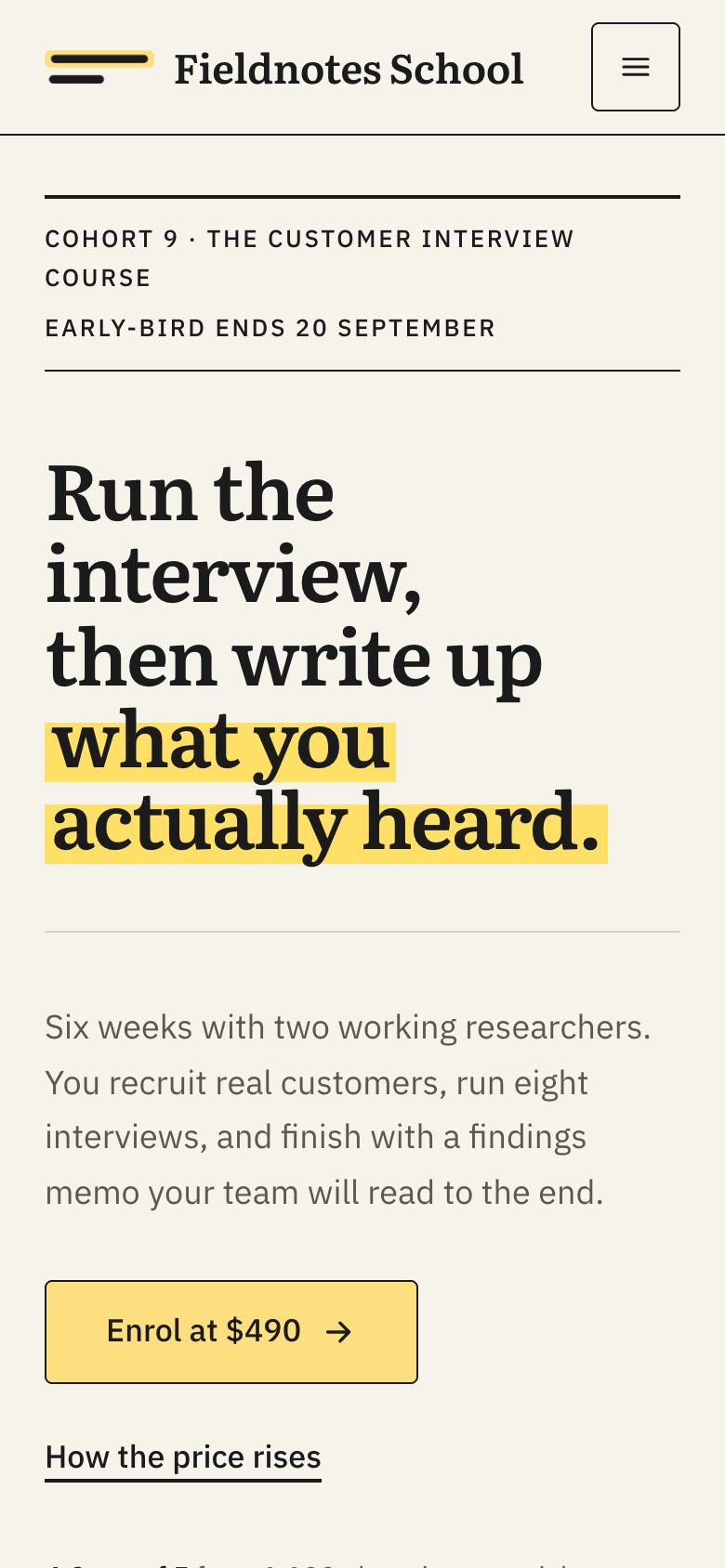
Online learning. Online Courses Daylight sells a catalogue; Learning Platform sells live cohorts; Course Early-Bird Enrolment sells one cohort with a dated price ladder.

Children. Preschool for nurseries and kindergartens; Summer Camp for camps and holiday clubs.

Common mistakes

Promising outcomes you cannot show. Share real results with context instead of guarantees of success.

Hiding the time commitment. Learners who drop out often underestimated the hours.

Generic stock photos of students. Real classes and teachers build trust; for children, get consent.

Choosing between the six education templates

Education pages divide by who is reading and what the first step is. When a student books a trial class with a tutor, Course Enrolment shows named instructors, pass rates with the base behind them, student stories and a three-step roadmap from leaving a number to the first class. When an adult saves a seat in a dated online cohort, Learning Platform shows the term timetable, the weekly commitment in hours and practitioners who still do the job.

If a single cohort course is selling with prices that rise on fixed dates, Course Early-Bird Enrolment draws the price ladder, index-card modules and a two-week guarantee. A platform with a catalogue of self-paced courses fits Online Courses Daylight, with course cards, ratings and plans. For children, the reader is a parent: Preschool books a campus visit with classrooms, ratios and fees, and Summer Camp reserves a place with the daily schedule, safety and tuition up front.

Writing for learners and parents

Education copy should describe what happens, not what might be felt. “Six weeks, two evenings a week, taught live by practitioners” is more useful than “transform your career”. For each course, state the level it starts from, what learners will be able to do at the end and the work they will produce along the way. If there is a prerequisite or an assessment of level, say how it works.

For parents, clarity about care comes before any description of activities. Put ratios, staff checks, first aid, food and pick-up arrangements in plain numbers and short sentences. Avoid educational jargon unless you explain it, and describe the approach you follow through examples from a normal day.

Results, safety and consent

Results are the most scrutinised claims on education pages. Publish pass or completion rates with the period and number of learners, and be careful with claims about jobs, salaries or grades, which advertising regulators in many countries treat strictly. Student stories should be told with permission and describe a concrete change.

Photographs of children and learners need written consent, stored with your records, and should show real classes rather than stock images. For online courses, screenshots of a live session or examples of student work are more persuasive than pictures of people with laptops.

What the enrolment or trial form should ask

A trial class form needs the subject or level, preferred times and contact details, and it should say who calls back and how quickly. Cohort courses can ask a few questions about current role and experience, which helps check the course is the right level before payment. Nursery and camp forms need the child’s age, preferred start date or session and a parent’s contact details; medical and dietary information should be collected securely later, not on a public form.

Reaching learners at the right time

Education is seasonal. Exam retakes, school terms, summer holidays and new-year resolutions all drive searches, so plan page updates and campaigns around those dates. Local schools and nurseries rely on map listings, parent groups and word of mouth; online courses depend on search, content and partnerships. Because sign-ups arrive with their source and campaign, you can compare which channels bring learners who actually finish, not just those who enrol.

Keeping dates, prices and places current

Education pages depend on dates: term starts, cohort launches, early-bird deadlines, camp sessions and open days. Put a routine in place to update the page as soon as a cohort fills or a date passes, and remove expired prices rather than leaving them crossed out. If you show places left, update the figure from your enrolment records, since families and learners notice when it never changes.

At the end of each term or cohort, refresh results, student stories and photographs, and date them. Pages that show recent outcomes and current teachers are more persuasive than ones that still describe a programme from two years ago.

A page for each programme

Schools and platforms with several programmes can give each its own page from the same template: a summer camp and an after-school club, or a beginners’ course and an advanced cohort. Each page speaks to one type of learner or parent, carries its own dates and prices, and can be linked from a single overview page.

From template to live page

Pick a template and it opens in the editor with its layout and sample copy. Replace photos with your own classes and teachers, update dates and prices, or tick “Write the text for my business” for about 20 credits and the AI rewrites the copy while keeping the design. Sign-ups arrive in your inbox with their campaign attached.

questions

Questions people ask

Which template suits an online course?
Online Courses Daylight for a catalogue of self-paced courses, Learning Platform for live cohorts, and Course Early-Bird Enrolment for one programme with a price ladder.
Is there a template for tutoring?
Course Enrolment is built for tutoring centres and exam prep, with a free trial class as the goal.
What about nurseries and camps?
Preschool is built for early-years settings that book visits; Summer Camp for dated children's programmes.
Can I show a guarantee?
Yes. Course Early-Bird Enrolment includes a two-week guarantee section you can adapt to your own terms.

Start from a template, or from a paragraph.

Starting from any template costs no credits. Or describe what you sell and the AI draws a page for your business, usually in about two minutes.