A guide download, a software demo request and a service enquiry each give visitors one clear next step through one form. On each lead-collecting landing page, visitors should understand what they will get and which details they need to give you.
These examples are illustrative layouts you can adapt, rather than published pages with measured results. Each shows how to explain the offer, back it up with relevant proof and decide which details to ask for. A checklist follows to help you check that each form submission is recorded as a lead.
Three examples that give visitors a clear next step
Visitors share contact details when you have made the next step clear. Before the form, show enough of the offer for them to judge whether it meets their need.
For a guide download, show what is inside. A guide to planning a home renovation, for example, could show its contents and part of its budget checklist. Explain how the reader can use it to organise costs before asking contractors for quotes. They can then judge its use before handing over an email address.
The form should ask for the email address that should receive the guide. Label the button ‘Send the guide’. A note beside the form should explain that the guide arrives by email.
For a demo request, show how the product works. A demo is a demonstration of the software. An appointment software page, for example, could show a screenshot of the booking calendar. A caption can explain how you manage available slots. The page text should explain how this helps with the visitor’s problem, such as keeping bookings organised.
Visitors need to know what the demo will cover and how you will arrange it. To prepare it, ask for a work email and any details you need. For example, you might need to know how the visitor currently handles bookings. ‘Request a demo’ makes clear that the button sends a request. It does not give immediate access to the software.
For a service enquiry, explain what work the service covers. A bookkeeping service page, for example, could state the work offered and the records needed. It could also explain what happens after an enquiry. A sample monthly report can show visitors what they will receive before they describe their business.
The form should ask for contact details and a short description of the work they need. Use ‘Discuss your project’, with nearby text explaining that you will reply to agree what work is needed before quoting. This makes the conversation easy to start. It also tells the visitor what to expect from your reply.
Rules for adapting an example to your offer
Keep what the example gives visitors, what it asks for and what happens next. The words, promise, images and proof should match what you actually offer.
- If the advert offers a bookkeeping guide, the page should name that guide and offer the download. A general introduction to your accounting services makes visitors search for the offer they clicked.
- Keep one goal and one form, so a guide download does not compete with a demo request. Ask for a detail only if you need it for the next step. A guide needs an email address for delivery. A useful service reply needs enough detail about what the visitor wants.
- Use images to answer a practical question. Show the product in use or what the visitor can expect to receive. For the bookkeeping enquiry, the sample monthly report explains the work more directly than a decorative office photograph.
- Place proof where visitors are likely to need it. Visitors may want to know whether you handle businesses like theirs. If so, put a quote from a client with a similar business near the service description. Keep claims from the example only if you can back them up.
At landflow, we offer all 196 finished landing page templates, drawn by designers, with sample text and working forms.
The template’s details tell you whether it has an enquiry form or an order form. Choose an enquiry form if you want to start a conversation. Choose an order form if the next step is placing an order.
Check the whole journey before sending traffic
Your page is ready for traffic when a visitor can follow the advert’s promise through to a recorded submission. That check includes the inbox as well as the page preview.
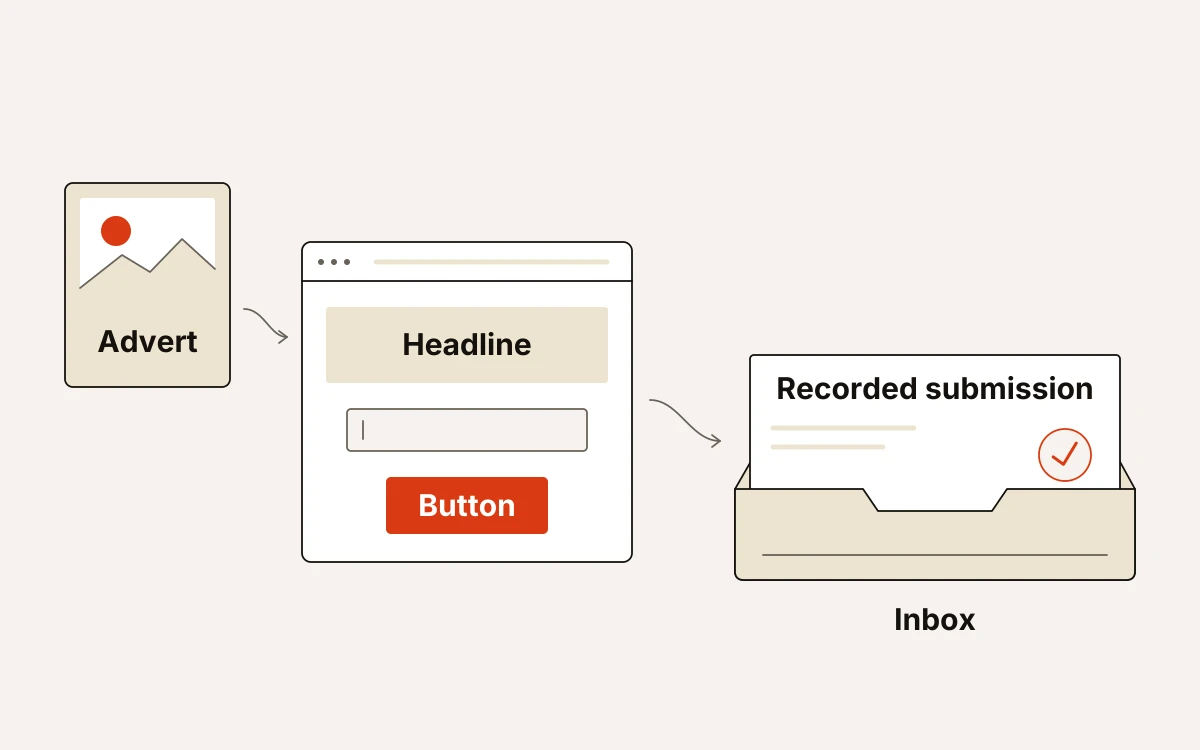
- Read the advert, headline and button together: they should describe the same offer and next step. A guide download button should not unexpectedly lead to a sales enquiry.
- On your phone, check whether the text is readable and the main button stands out and is comfortable to tap. Watch the images load, too: oversized files can delay the content visitors came to see.
- Submit the form from your campaign link so you follow the visitor’s route instead of opening the page directly. The submission should appear in the inbox with the details you entered.
- Inspect the campaign details on that record: the source, medium, campaign, click ID and landing URL, plus the consent state. These connect the enquiry to the traffic that brought it.
At landflow, we stamp those details on the server when you submit and write the lead to the inbox before any pixel fires.